B2B SaaS Sales Proposal Software That Actually Improves Close Rates in 2026
Most sales proposal tools help you build interactive quotes, collect e-signatures, and track engagement. But deals still stall when buyers want flexible payment terms and finance needs cash upfront. This guide compares leading sales proposal software like Qwilr, PandaDoc and more. It then shows when proposal-only software falls short. Finally, it explains how embedding CPQ, billing, and buyer financing with Ratio Boost turns your proposals into close-ready revenue flows. You collect the full contract value upfront. Your buyer pays over time.


Table of contents

Most sales proposal tools help you build interactive quotes, collect e-signatures, and track engagement. But deals still stall when buyers want flexible payment terms and finance needs cash upfront. This guide compares leading sales proposal software like Qwilr, PandaDoc and more. It then shows when proposal-only software falls short. Finally, it explains how embedding CPQ, billing, and buyer financing with Ratio Boost turns your proposals into close-ready revenue flows. You collect the full contract value upfront. Your buyer pays over time.
The Challenge: It’s Not Building Proposals, It’s Getting Them Paid
You’re likely here because you want proposals that quote fast, look polished, and support e‑sign. Most tools check those boxes.
But here’s the hidden friction:
- Buyers ask for flexible terms
- Finance wants upfront cash
- Reps, caught in between, discount to close; hurting margin and delaying revenue
This guide compares top sales proposal software like Qwilr, PandaDoc and more, based on the features that actually move deals forward. Then we will show when proposal‑only software fall short and how embedding CPQ, billing, collection, and buyer financing with Ratio Boost can turn signed docs into revenue‑ready contracts.
👀 But before we get into why proposals fall short, let’s look at what most sales proposal software actually promises to offer in 2026.
What Counts as “Sales Proposal Software” Today?
Let’s break this down like we’re in a room together.
You’re evaluating tools. You want to understand what qualifies as sales proposal software in 2026, what these tools actually offer, and whether any of them solve the problem you're dealing with.
So let’s start with the obvious question:
What Does "Sales Proposal Software" Actually Mean?
At its core, sales proposal software is a tool that helps your team create, send, and track business proposals. These proposals often include pricing, product details, contract language, and digital signature collection.
If a tool helps a sales rep move from quote created to contract signed, it probably fits in this category.
But that’s just the broad definition. Let’s get more specific.
What Features Do Buyers Expect from Sales Proposal Software?
There are five features that nearly every proposal tool today promises. These have become the industry baseline. If a tool doesn’t offer these, it likely won’t even be considered.
Let’s go through each one clearly.
1. Templates and Proposal Builder
Most teams don’t want to start from scratch every time they build a proposal.
So tools like Qwilr, PandaDoc, and GetAccept all offer template libraries and drag-and-drop editors. This lets sales reps quickly assemble proposals that look professional and match company branding.
Why this matters: It saves time, ensures consistency, and ensure that every proposal (whether created by a new hire or a seasoned AE) meets your company’s brand and legal standards.
2. Pricing Tables or Interactive Quotes
Today’s buyers expect to see clear pricing, and in many cases, they want to interact with it.
Proposal software often includes pricing tables, where reps can add plans, usage tiers, or toggles for monthly vs. annual billing.
Why this matters: It creates transparency and helps reduce back-and-forth before closing.
3. E-signature Integration
This is now considered table stakes.
Once a buyer approves the terms, most tools allow them to sign the proposal digitally. The signature is legally binding, includes an audit trail, and can usually be completed from any device.
Why this matters: It shortens the sales cycle and eliminates paper-based delays.
4. Engagement Analytics
Most proposal software includes basic buyer engagement tracking.
This means the rep gets alerts when:
- A buyer opens the proposal
- A certain section is viewed
- The proposal is forwarded internally
Why this matters: Reps know who’s reading what (and when) to time their follow-ups better.
5. CRM Integration
This is where things get technical, but stay with me.
Many proposal tools integrate with CRM systems like Salesforce, HubSpot, or Zoho, allowing them to:
- Pull in deal data automatically (e.g., contact info, pricing)
- Push updates back (e.g., “proposal sent,” “contract signed”)
- Trigger next steps in your workflow
Why this matters: It keeps everything in sync and avoids manual copy-pasting between tools.
Clearly, if a tool offers all the features we discussed, it fits the definition of sales proposal software in 2026. You might pick one based on this list, but let’s be honest: most of these tools were built to help you send cleaner proposals faster. They weren’t built to handle:
- Buyers asking for net‑30, net‑60, or custom payments
- Finance teams demanding upfront cash flow
- What happens after the signature: billing, collections, and buyer risk
That’s the part they don’t highlight on feature pages, and it’s exactly where deals get stuck, delayed, or discounted.
What Are the Hidden Constraints in B2B SaaS Sales Proposal Software These Days?
Most sales proposal software looks solid on the surface. They check the feature boxes, help reps send polished docs, and make signing easy.
But talk to any mid-market SaaS team, and you’ll hear the same story:
“We’re not losing deals because of how proposals look. We’re losing them because of how they work after the signature.”
Let’s break down the real-world constraints you won’t see on a vendor’s landing page:
(Check out this post with proven tactics of closing high-value SaaS deals faster)
1. Buyers Want Flexible Terms. Finance Wants Cash Now.
What happens:
- Your buyer asks to pay monthly. Finance wants the whole amount upfront.
- Your rep is stuck negotiating discounts just to close the gap.
Why it’s hidden:
- Most proposal tools stop at the e‑sign. They don’t address cash timing or payment preferences.
How it shows up:
- Deals stall late in the cycle
- Reps offer steep discounts to “rescue” cash flow
- Finance teams can’t forecast accurately
2. Most Tools Assume One-Time or Annual Payment
What happens:
SaaS deals often involve:
- Upfront fees + recurring billing
- Add-ons, usage tiers, and renewal triggers
- Net-30, 60, or custom payment plans
But many tools can’t handle complex billing models or sync them to your CRM cleanly.
Why it’s hidden:
- You won’t notice until a deal gets complicated.
How it shows up:
- Reps resort to off-tool workarounds
- Finance cleans up billing errors post-signature
- Approvals and collections break down
3. No Infrastructure for Collections, Risk, or Cash Management
What happens:
If the buyer pays over time, someone has to manage:
- Risk underwriting
- Billing cycles and retries
- Collections and dunning
Most proposal tools aren’t built for this.
Why it’s hidden:
- It doesn’t break until you try to offer terms or scale your finance operations.
How it shows up:
- Missed invoices and delayed cash
- Higher write-offs and bad debt
- Manual follow-ups eating Ops team time
4. Workflows Break Under Discount Pressure
What happens:
Enterprise deals often need custom pricing and internal approvals. Proposal tools may offer basic discount workflows, but not:
- Margin guardrails
- Term-based pricing logic
- Approval chains that map to RevOps policy
Why it’s hidden:
- Basic discounts are fine…until your reps push the limits.
How it shows up:
- Pricing errors
- Delays in approvals
- Inconsistent quote logic between reps
5. Forecasting Falls Apart
What happens:
If a proposal closes with net terms or flexible billing, your finance team needs to model:
- Deferred revenue
- Collections risk
- Cash flow timing
But proposal tools rarely connect to your financial model or rev-rec system.
Why it’s hidden:
- It looks like a win until the cash doesn’t come in.
How it shows up:
- CFOs flying blind
- Misaligned bookings vs revenue
- Fragile forecasts
6. Complexity Breaks the System
What happens:
- As your product lines grow and pricing evolves, the proposal tool can’t keep up.
- Suddenly, you’re quoting outside the system, or relying on spreadsheets again.
Why it’s hidden:
- Early-stage use cases don’t expose it. Mid-market growth does.
How it shows up:
- Inaccurate quotes
- Broken handoffs between Sales and Finance
- Declining trust in the proposal system
Now that we’ve unpacked where most tools fall short, let’s talk about what really moves the needle.
The features and capabilities that actually get your deals paid.
The Sales Proposal Software Feature Scorecard That Actually Gets Deals Paid
We’ve already shown you what most sales proposal software promises and where hidden constraints hold teams back.
Now, here’s a quick scorecard to help you zoom in on what really matters.
Instead of just listing features, we’re showing you:
- Which capabilities actually accelerate deal flow
- Which ones break down under real-world complexity (pricing, approvals, collections)
- And where most proposal tools simply don’t go
If you're evaluating sales proposal software, this isn’t a checklist of what’s trending; it’s a filter for what’s financially effective.
| Feature | What It Does | Impact on Getting Paid |
|---|---|---|
| Editor & Templates | Lets reps create branded, mobile-ready proposals with saved sections and dynamic variables | ✅ Speeds rep execution, reduces friction in approvals |
| Interactive Pricing Tables | Buyers can adjust tiers, quantities and see totals update in real time | ⚠️ Buyer-friendly, but can’t enforce discount logic or pricing conditions |
| E-Sign & Payment Collection | Enables signing and one-time payments (e.g., via Stripe with QwirlPay) | ⚠️ Works for upfront deals, but stalls if buyer requests monthly terms |
| Proposal Analytics | Tracks open rates, time spent, and sections viewed | ⚠️ Good for follow-up timing, but disconnected from forecasting or risk scoring |
| CRM Automation | Syncs with Salesforce or HubSpot; updates contacts and deal stages | ✅ Helps reduce errors and duplicative entry; if not gated behind enterprise tiers |
| CPQ + Billing + Collections + Financing | Handles complex quotes, embeds financing, and automates collections. So you get paid upfront while your buyer pays over time | ❌ Eliminates the discount-vs-cashflow tradeoff entirely: the #1 deal blocker in SaaS |
What you just saw in the scorecard above isn’t just a feature breakdown—it’s a signal. CPQ, billing, collections, and financing didn’t just make the list… they scored highest on accelerating deal velocity and actually getting revenue in the door.
And trust me if you’re in the market for a new proposal software or thinking of switching the old one, don’t stop at templates and pricing tables.
Look at what’s possible today. Look at what’s worth picking. Look at what actually moves revenue forward.
To make that choice easier, here’s a side-by-side comparison: standard sales proposal software vs. a unified proposal, CPQ, and financing workflow. Let’s go.
Sales Proposal Software vs. Ratio Boost’s Unified Quote-to-Cash | Comparison Table
In B2B SaaS, sending a proposal is just one step in a much longer quote-to-cash journey.
The problem? Most teams are stitching that journey together with a patchwork of tools— proposals here, quotes there, billing in spreadsheets,
and financing... nowhere.
That’s not a workflow. That’s SaaS sprawl, a bloated tech stack where disconnected systems slow down deals and drain ops resources.
We broke down this exact problem in our full SaaS sprawl post →
The fix exists. Its Ratio Boost—a unified engine that combines proposals, pricing, billing, collections, and embedded buyer financing—all in one one connected platform:
- Proposals with embedded pricing and terms
- Dynamic CPQ that handles complex approvals
- Automated billing and collections
- Embedded financing so buyers can pay on their terms but you still get paid upfront
It’s no doubt faster, smarter, and more financially effective. So instead of debating feature by feature, let’s go deeper: What’s the real difference between proposal-only tools… and a unified quote-to-cash system like Ratio Boost?
Let’s break it down.
| Capability | Standard Sales Proposal Software | Ratio Boost: Unified Quote-to-Cash |
|---|---|---|
| Proposal Builder | Drag-and-drop editors, templates, branding | ✅ Polished proposals built with embedded CPQ + terms selection |
| Interactive Pricing Tables | Basic pricing grids, limited logic | ✅ Dynamic, configurable pricing with guardrails + term toggles |
| E-signature | Included; sometimes gated behind plans | ✅ Built-in e-sign + payment terms in one flow |
| Payment Collection | Stripe + platform fees (e.g., QwirlPay) | ✅ Embedded BNPL: Buyers pay over time, and you receive upfront payment |
| Proposal Analytics | Time on page, views, section clicks | ✅ Full funnel analytics + revenue forecasting insights |
| CRM Integrations | HubSpot, Salesforce (limited by plan) | ✅ Native Salesforce + HubSpot integration across the flow |
| Approvals + CPQ | ❌ Manual; often handled outside the tool | ✅ Integrated CPQ with automated pricing, terms, and approvals |
| Billing + Collections | ❌ Requires separate systems or manual work | ✅ Triggered automatically from signed proposal |
| Financing Options | ❌ Not available | ✅ Built-in buyer underwriting, net terms, and monthly options |
| Upfront Cash Flow | ❌ Only if buyers pay in full | ✅ You collect 100% TCV upfront—Ratio handles the rest |
| Who Does the Chasing? | You. | ✅ Ratio. We handle billing, follow-ups, collections. |
| Workflow Impact | Looks good, but ops-heavy after the e-sign | ✅ Proposals turn into closed, cash-collected contracts—fast. |
Here’s how Ratio’s unified workflow looks like:
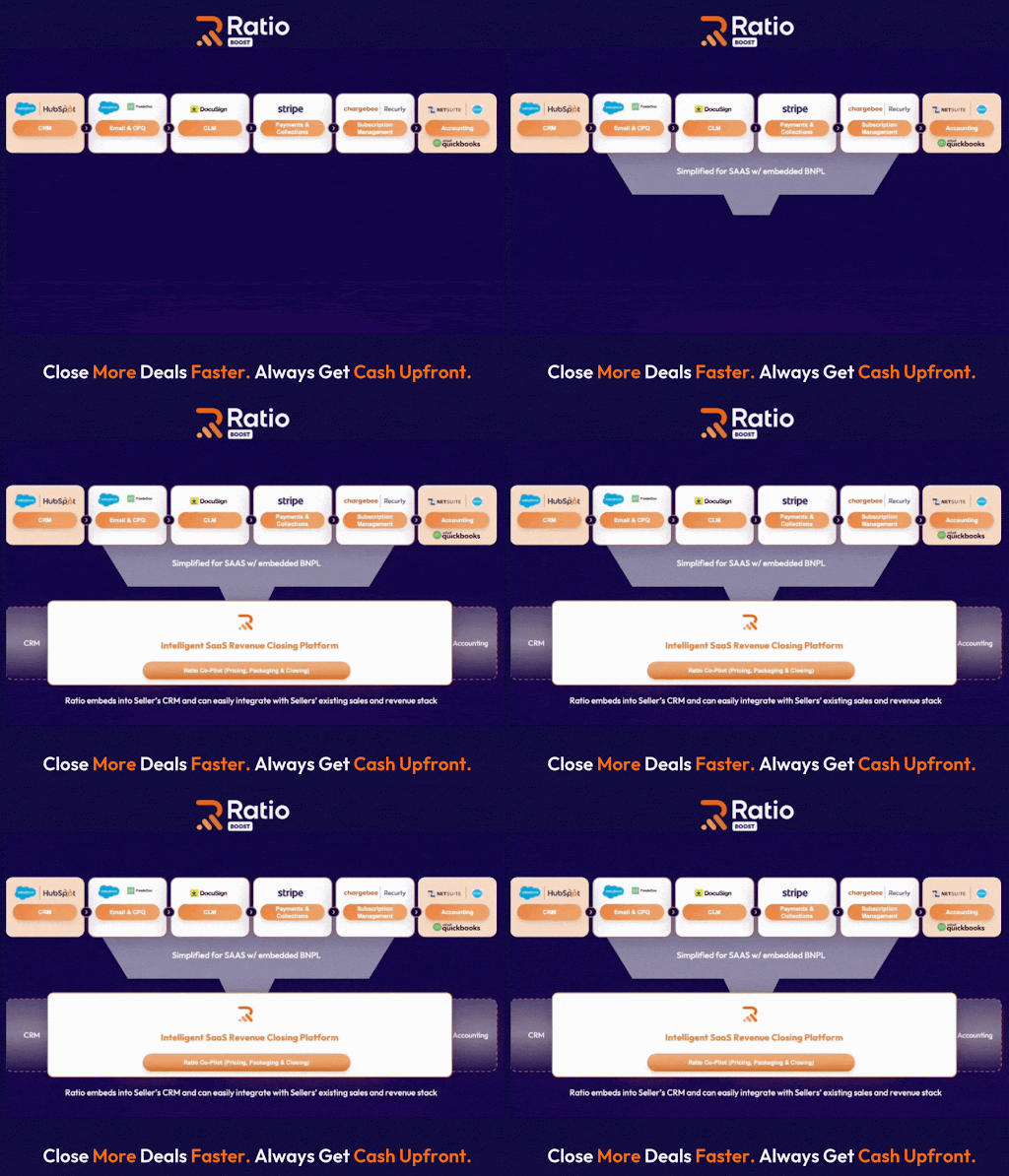
But I assume you might be thinking, do all teams need the full engine? Yes, it’s a fair question. In some cases, a clean proposal tool might be just enough. In others, adding CPQ, billing, and financing is what unlocks scale.
Let me tell you who’s fit for what and needs what:
Who Should Choose Proposal‑Only Software
- Simple SaaS tools with low ACV and no complex terms
Think <$1K ACV, monthly swipe-card subscriptions, no custom pricing or approvals. Speed matters more than flexibility. - Small teams without quote-to-cash complexity (yet)
Startups or solopreneurs where proposals are static, and billing or financing is handled post-signature, manually or via Stripe links.
Who Should Upgrade to Proposal with Embedded Financing
- Mid-market SaaS vendors selling $10K+ deals with net terms
If buyers ask for installments but your finance team wants full cash upfront, you need embedded financing and CPQ. - Hardware, MedTech, or services bundled with subscriptions
Complex quotes, approvals, and staggered payments demand more than a pretty PDF—you need automation from quote to cash. - Companies aiming to increase conversion
If you want to boost win rates without manual negotiation, embedding financing options directly in the proposal gives buyers a faster path to "yes."
- Teams relying on heavy discounting to close deals
If reps offer discounts just to get deals over the line, embedded financing gives them a new lever: flexible terms that preserve margin and still convert.
Now, with or without Ratio Boost, one thing’s certain: every revenue team needs a solid sales proposal software.
Why? Because quoting, sending, and signing still start the sales motion. Whether you’re collecting payments upfront or offering flexible terms later, you can’t skip the proposal.
So if you’re evaluating tools, start here:
Top-Ranked Sales Proposal Software for B2B SaaS (Honest Reviews)
You asked: “Which sales proposal software really works for SaaS?”
But here’s the catch: the market is flooded with options and growing fast. In fact, the global sales proposal software market is projected to hit $5.81 billion by 2030, expanding at a 12.2% CAGR.
That makes picking the right tool more confusing and more critical.
That’s why we curated a shortlist of six proposal software options trusted by modern B2B SaaS teams:
- Qwilr
- Proposify
- PandaDoc
- GetAccept
Each one is ranked based on honest reviews and ratings, not hype.
Let’s take a closer look at each, one-by-one:
#1. Qwilr

Why It Ranks High
- On its G2 feature page, Qwilr reports: Qwilr’s e-signature capabilities (including document signing, reminders & expirations, mobile signatures, and signature workflows) are highlighted with hundreds of verified user reviews referencing these features, showing consistent feedback from real customers.
- Over 823 reviews on G2, with many highlighting polished, interactive proposals.
What It Offers
- Web-based proposals you can send as a link (not PDFs)
- Embedded media, pricing tables, and interactivity
- Analytics: see which sections your prospects viewed, when
Limitations (from user feedback & comparisons)
- Some complexity in handling templates or advanced conditional logic when customizing deeply.
- Occasionally a bit of a learning curve when coming back to less-frequent tasks.
How It Works With Ratio Boost
You can continue using Qwilr for proposal creation and prospect experience. Ratio Boost can layer CPQ, billing, collections, and financing over it—without replacing the front end.
#2. PandaDoc

Why It Ranks High
- Recently spotlighted for ease of use, security protocols, and solid feature balance as of January 2026 review.
- From seller/vendor page, PandaDoc supports e-sign, document workflows, quotes, and compliance (SOC 2, HIPAA, GDPR) for document security.
What It Offers
- Strong template library and content management
- Fully integrated document + signature + approval workflows
- Compliance and security built in (important for regulated industries)
Limitations (from user feedback & comparisons)
- Some users cite that lower-tier plans limit features or support modes (phone support).
- For ultra-custom pricing > plans, you might hit limits in out-of-the-box logic.
How It Works With Ratio Boost
Use PandaDoc for its document capabilities and signature workflows. Ratio Boost can handle the heavier revenue side—billing, collections, financing—on top of PandaDoc’s base.
#3. Proposify

Why It Rates Well
- Proposify has “close to 1,000+ verified G2 reviews” and a score of 4.6.
- G2 user comments highlight ease of use, improving feature set, and strong support.
What It Offers
- Rich template library with dynamic variables and custom fields
- Strong analytics & dashboards (proposal volume, acceptance)
- Approval workflows, branding control, and CRM integrations
Limitations (based on user feedback)
- Some users find editing templates or deep customization tricky.
- Formatting or UI quirks reported in certain template/pop-up elements.
How It Works With Ratio Boost
You can keep using Proposify as the front-end proposal tool. Ratio Boost can plug in behind it to add CPQ, billing, collections, and financing—bridging the gap those proposals leave.
#4. GetAccept

Why It Rates Well
- G2 reviews say users love its user-friendly interface, document tracking, and smooth contract management experience.
- In 2025, GetAccept was ranked #17 on G2’s Best Sales Products list.
What It Offers
- Digital sales rooms combining proposals, documents, and room-based buyer engagement
- Document analytics and templates with CRM integration
- Strong contract management and process flow tools
Limitations (based on feedback)
- Some reviews mention limitations in template flexibility or deeper custom document logic.
- Slight learning curve reported for advanced features.
How It Works With Ratio Boost
Use GetAccept to run the buyer-facing engagement and contract experience. Ratio Boost then adds the financial muscle (CPQ, billing, embedded financing, and collections) beyond what GetAccept handles natively.
These are a few of the most trusted sales proposal software options for B2B SaaS — and the list goes on. But no matter which software you choose, none of them solve the financing and payment flexibility issue.
The good news is, Ratio Boost works alongside all these proposal tools, extending their capabilities with CPQ, billing, collections, and financing.
Let’s dive deeper to understand how it works.
Ratio Boost: The Essential Extension to Your Sales Proposal Software
Let’s start with a simple truth:
“The best software isn’t the one that does everything. It’s the one that plays well with everything else.”
You’ll find this principle echoed in developer blogs, product forums, and SaaS design playbooks. It’s more relevant than ever.
Why? Because no one wants a bloated, do-it-all tool that underdelivers. What wins instead is a lean system where each product does what it does best — and the right extensions fill in the gaps.
Ratio Boost is that extension. It plugs into your existing proposal stack (like Qwilr, PandaDoc, etc.) and adds the capabilities most tools leave out:
- CPQ (Configure-Price-Quote) — to handle complex pricing logic
- Automated Billing — triggered right after signature
- Collections — with reminders, tracking, and smart nudges
- Embedded Buyer Financing — so your buyer can pay over time, but you get paid upfront
All of this runs natively, without requiring reps to change how they send quotes.
Next, let's take a quick look at how you go about implementing Ratio Boost.
Here’s How to Implement Ratio Boost — In 6 Simple Steps
Step 1: Create an offer by selecting or adding a buyer
From your CRO (e.g., Salesforce) or from Ratio dashboard, your sales rep clicks “Create Offer.” For new buyers, they enter basic details like legal name and address. For returning buyers, they can search and select the contact instantly.
Step 2: Submit the offer to Ratio for underwriting
Ratio evaluates the buyer in real time using its proprietary underwriting engine. Most credit decisions return in seconds.
Step 3: Send offer to Buyer
After the offer is underwritten, your rep can review the payment terms and send the offer to the buyer.
Step 4: Buyer receives a personalized offer link
The buyer gets a secure link to view their plan options. They can toggle between terms, compare against the upfront price, and share the offer internally or message the rep—entirely self-serve and transparent.
Step 5: Buyer selects a plan, signs the agreement, and enters payment details
The buyer chooses their preferred payment plan, signs electronically via Ratio’s e-sign flow, and sets up payments. If they’re a returning buyer, payment details are pre-filled.
Step 6: Seller receives the full upfront payment
Ratio disburses the cash advance—typically within one to three business days after the buyer’s first payment clears. Reps can track payout status directly in the dashboard.
BONUS:
Ratio manages invoicing, reminders, and collections
Ratio handles all post-sale activity: sending invoices, reminders, and managing failed payments or collections—so your team doesn’t need to follow up or manage AR manually.
Renewals and add-ons are included
Buyer data, payment preferences, and verification info are saved—allowing reps to generate new offers instantly without repeating the onboarding process. Renewals can be set and forgotten.
What Happens When You Add Ratio Boost in Your B2B Sales Workflow?
Let’s take DearDoc, a fast-growing SaaS company, as an example. Here is how they work before and after implementing Ratio Boost.
Before Ratio Boost:
- Multiple tools to quote, bill, and collect.
- Manual follow-ups after sending proposals.
- Revenue stuck in internal approval loops.
After Ratio Boost:
- One smart link: proposal + CPQ + financing in a single flow.
- Buyers choose payment terms (monthly, quarterly, net 60, etc.).
- Funds disbursed within hours — up to 96% upfront.
- Result: +25% increase in close rate and faster cash conversion.
Hear it from the Founder
If you want to see similar results, book a 15‑minute strategy call — we’ll show you how to close more deals and grow your SaaS revenue.
Most Frequently Asked Questions (FAQs) Around Sale Proposal Software
1. Is a Web-Based Proposal Better than a PDF?
Yes, in most modern sales contexts (especially in B2B SaaS) web-based proposals offer clear advantages over static PDFs.
Pros of web-based proposals (e.g., Qwilr, Ratio’s embedded quoting):
- Responsiveness: Automatically adapts to any screen—mobile, tablet, or desktop.
- Analytics: Get real-time insights on buyer engagement (e.g., time spent on each section, whether pricing was viewed).
- Version Control: Always up-to-date; no risk of outdated attachments.
- Interactive Elements: Embedded videos, pricing calculators, or scheduling tools increase engagement.
- Conversion Optimization: Easier to integrate CTAs like "Accept Now," reducing friction in decision-making.
Cons:
- Access Issues: Requires internet access; sometimes blocked by strict firewalls.
- Exportability: Not always easy to print or archive for legal/compliance needs.
Our Take: As the market shifts to B2C-like buying expectations in B2B, interactivity and responsiveness are must-haves. Static PDFs are becoming relics of a slower, more transactional sales cycle.
2. Can Proposal Tools take Payments?
Yes. Modern proposal platforms increasingly support integrated payments. Qwilr, for example, offers this through QwilrPay, powered by Stripe.
How it works:
- Your customer views the proposal online.
- At the bottom of the page or quote, they can pay instantly (e.g., via card or ACH).
- Stripe processes the payment, and Qwilr typically adds a platform fee (e.g., 2-3% of the transaction).
Strategic Implication: This is especially powerful in SMB sales or for add-ons/upsells. It compresses time-to-close, removes payment friction, and improves cash conversion.
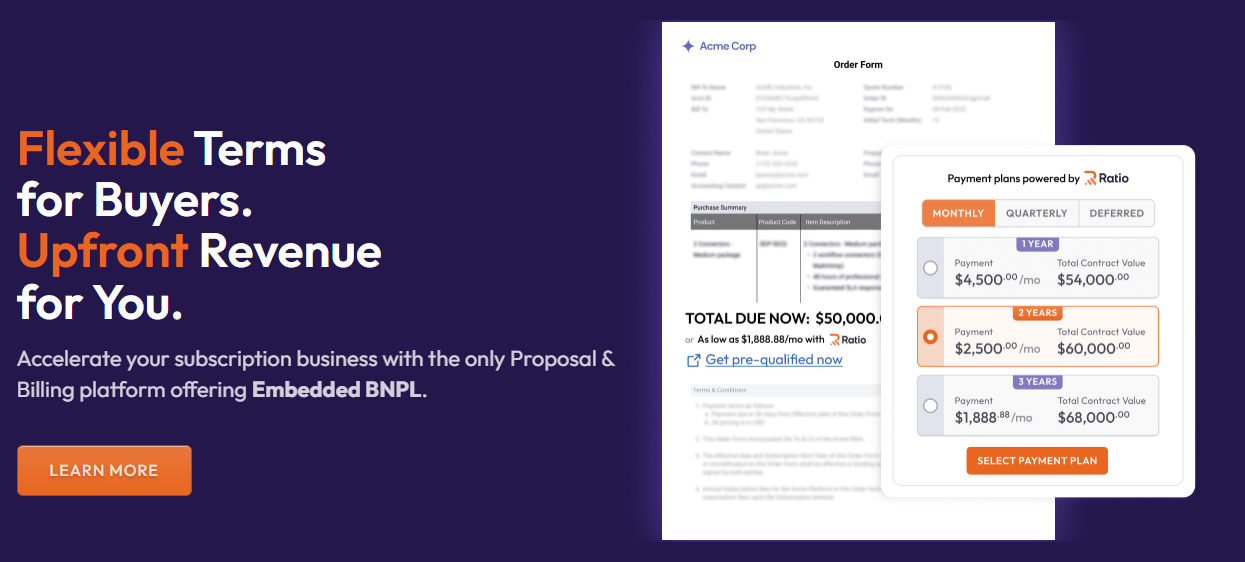
Ratio's Role: If you’re closing larger, financed contracts (e.g., $25K+ with monthly terms), Ratio acts as the embedded financing layer—beyond what Stripe or QwilrPay can do—by giving sellers full TCV upfront while buyers pay over time.
3. When do I Need CPQ Instead of Simple Templates?
You need CPQ (Configure, Price, Quote) when your pricing model gets complex; whether due to product configuration, discounting logic, approvals, or renewals.
Indicators it's time for CPQ:
- Tiered or usage-based pricing that varies per client.
- Multi-product bundles or services sold with variable SKUs.
- Approval workflows for discount thresholds or margin protection.
- Recurring deal structures with renewals, upsells, or co-terminations.
- Finance team needing TCV/ACV visibility before quote approval.
Enter Ratio: Unlike standalone CPQ tools, Ratio gives you:
- CPQ plus embedded financing at the quote stage.
- AI-powered pricing co-pilot (uses actual customer + lender data).
- Full quote-to-cash workflow: from proposal → checkout → payment plan → subscription → collections.
In short: if you're scaling a B2B SaaS company and juggling 3+ tools to manage quoting, pricing, and payment terms, it’s time for a CPQ—ideally one like Ratio that consolidates the workflow and aligns Sales, Finance, and RevOps.
4. What if Buyers Want Monthly Terms, But I Need the Cash Upfront?
This is where embedded financing solves the classic seller/buyer misalignment.
With Ratio:
- Buyer gets monthly (or quarterly) payment terms, improving their budget alignment.
- Seller gets 100% of TCV upfront—no working capital delay, no collections risk.
- Ratio handles the credit risk, collections, and payment operations.
Example:
A $60K annual SaaS deal is converted into 12 x $5K monthly payments for the buyer, while the seller receives the full $60K (minus a platform fee) upfront.
Why it matters:
- Increases win rates: removes sticker shock or budget objections.
- Preserves margin: no need for steep discounts.
- Predictable cash flow: Ratio advances the full amount, so your revenue recognition and planning stay intact.
MarketJoy and DearDoc, sellers using Ratio increased close rates, ACV, and reduced discounting—while buyers appreciated flexibility without the need for drawn-out procurement processes.
↗
The Closing Motion Platform
Sellers on Ratio see up to 30% higher close rates and 25% higher ACV.


